JMN Excel Assistant · Analyst-built

An analyst's assistant,
right inside Excel.

Inside Excel · a task pane Grounded · reads the range you select Propose-first · nothing writes till you Apply Builds models · from a ticker or a file

The JMN AI Assistant opens as a pane beside your workbook. Ask questions grounded in the cells you select, write formulas in plain English, and build or update full financial models — from a ticker or an uploaded file. Every change is proposed first; nothing is written until you press Apply.

See what it does
JMN Excel Assistant · Proposed changes
Model Updater
📄Company_Model.xlsx · active sheet · Equity Research
D47 Revenue — Segment
UPDATE
$28,522M $29,888M
New quarter from the uploaded filing. Your revenue-bridge formula in D47:D52 preserved.
D89 EPS — Adjusted
UPDATE
$2.91 $3.30
Latest actuals. Your adjusted-EPS formula kept; the link to D47 is maintained.
E52 FY Revenue — estimate
UPDATE
$118,400M $120,850M
Estimate rolled on the new guidance. Your sensitivity table in D55:D58 updates with it.
🔒 Never touched — your formula logic preserved: D47:D52 · DCF sheet · Comps tab
3 proposed changes · nothing written yet · press Apply to write
3 CHANGES APPLIED TO WORKBOOK
Model updated · your formulas intact · audit log written
Inside Excel
Opens as a task pane —
no new platform to learn
Apply to write
Every change is proposed
before it touches a cell
Ticker or file
Build models from SEC EDGAR
filings or your own upload
The real problem

Build models in your format —
and keep every one current.

The desk loses time to two jobs: building models and keeping them up to date. JMN Excel Assistant turns your own template into an agent that builds a new model in your format at the click of a button — and updates your existing models from the latest filings just as fast. Every change is proposed for your approval.

50%
Of your data and model work handled inside Excel
2×
Your coverage — maintain more names with the same team
1click
Build a new model in your template, or update one from the latest filing
What it does

Chat, build, update —
and customize to your desk.

Every capability is grounded in your data, and every change waits for your approval. Run the model builders and updater from the Agents menu — or have us build a custom agent around your own workflow.

Chat Assistant
Ask & edit your sheet
Grounded in your selection
Answers questions about the range you select
Writes formulas from a plain-English request
Edits, reshapes or cleans data — proposed, then Apply
Financial Model Builder
Build a model
From a ticker · or a file
From a ticker — pulls SEC EDGAR filings and builds the statements
From an upload — consolidates a per-period workbook
Choose statements and the period range, then inject into Excel
Model Updater
Extend it each quarter
Adds new quarters in place
Finds newly reported quarters and extends the active sheet
Takes Excel, PDF, images or markdown as the new data
Keeps the model you already built — links and formulas intact
Custom Agents
Built to your requirements
Your template · your workflow
Give us your model template — we build an agent that produces it in your format on a click
Comp builders, consensus trackers, valuation updaters — automated to spec
Scoped and built with a JMN analyst, tested on your own model
Accepts →
Excel.xlsx · .xls
PDF
ImagesPNG · JPG · WebP
Markdown
TickerSEC EDGAR
See it in Excel

A pane beside your sheet.
Agents a click away.

The Assistant opens next to your workbook. Pick an agent from the Agents menu — Financial Model Builder or Model Updater — or start from a prompt, always grounded in the cells you have selected.
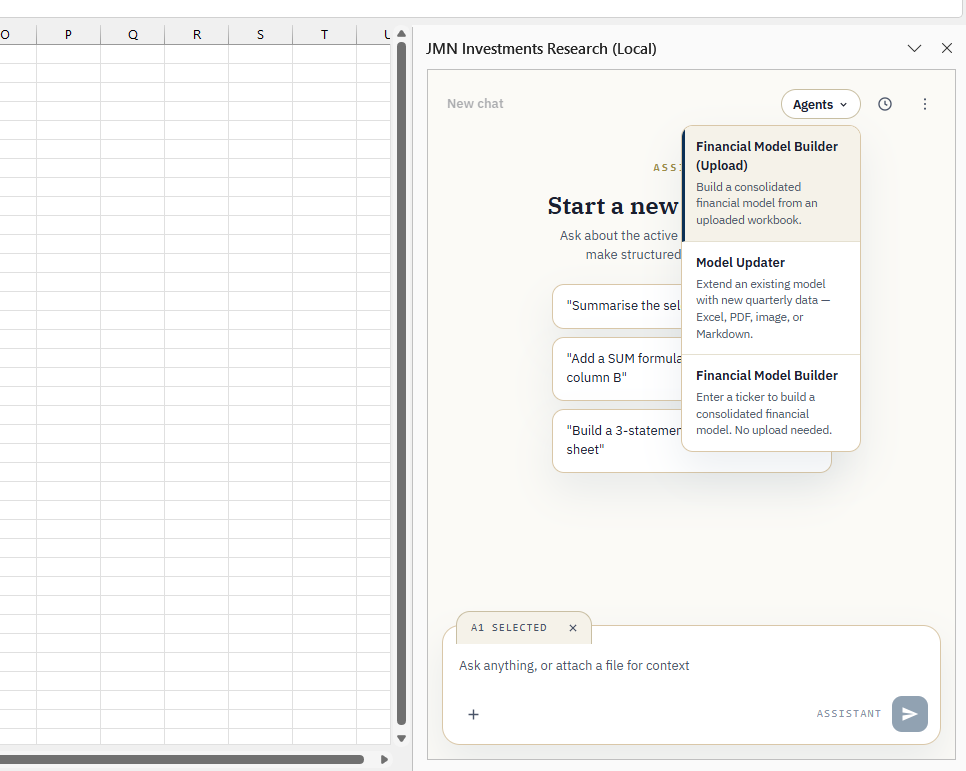
JMN Excel Assistant task pane with the Agents menu open
Inside Excel
The task pane, live
The Agents menu lists the Financial Model Builder — from a ticker or an upload — and the Model Updater. The selection badge shows exactly which cells the Assistant will read, and prompt starters get you moving in one click.
Governance

Every change is proposed.
Nothing writes until you Apply.

You stay in control of what data is shared and what changes — the propose-first flow is simply how a tool built by analysts behaves.

What the Assistant does
Everything, shown
before it happens.
Reads the cells you select — and asks before reaching wider
Proposes every change — the edit shown before it's made
Writes only when you press Apply
Builds and updates models into your own workbook
What stays with you
Every decision that
touches the model.
Approve, reject or edit every proposed change
Decide what data is shared with the Assistant
The workbook reflects your judgement, not the tool's
Nothing is ever written to a cell silently
The Assistant proposes. You Apply. The workbook only ever changes when you say so — and every change is yours to review first. That is the whole point of building it inside Excel.
See it on your model

Try it on one
of your own models.

Send us a model, or just a ticker. We will show you the Assistant building it, updating it, and proposing every change — inside Excel, on your approval. Not a generic demo.

Email us directly