03.2 — Advanced
Keeping Results in Sync
Edit a prompt after its column already has answers, and JMN AI deliberately does not go quietly recompute everything downstream. It marks the affected cells stale and waits for you.
Why not just auto-recompute?
Auto-recomputing on every edit sounds convenient until a small prompt tweak silently changes forty already-reviewed answers in the background — and now you can't tell which of those forty you actually checked. JMN AI treats "the prompt changed" and "the answer updated" as two separate, human-controlled steps. Nothing recomputes until you tell it to.
What "stale" actually does
When you change a property's prompt or output type, any cell that already has a result for that property gets flagged. The cell keeps showing its last answer — it doesn't go blank — but it's visibly marked as out of date until you re-run it.
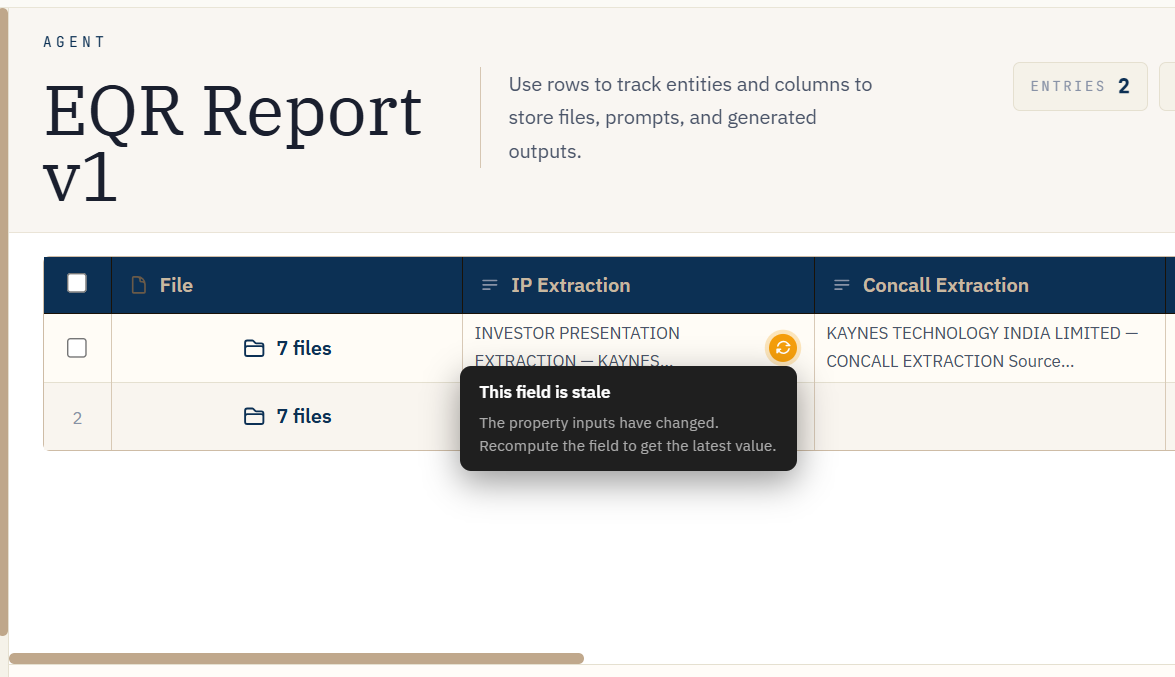
FIG. 9.1 — Old answer, clearly marked, never silently replaced.
Where this shows up
- Editing a prompt or output type on a property that already has results.
- A column that references another column via
@output[id::name]— changing the upstream column doesn't recompute the one that reads it; it marks it stale instead. - Inside collections, the same rule applies per file row, so a prompt edit doesn't quietly rewrite results across every file in a collection at once.
Note
Two people editing the same cell at once can't silently overwrite each other either — every cell write checks the version it's based on, and a write that's gone stale in the meantime is rejected rather than applied. You'll see this as a refresh prompt, not lost work.