02.5 — Building Agents
Settings Reference
Every setting on a property, what it controls, and what it defaults to. Use this page to look something up — for the reasoning behind each one, see the rest of section 02.
7.1
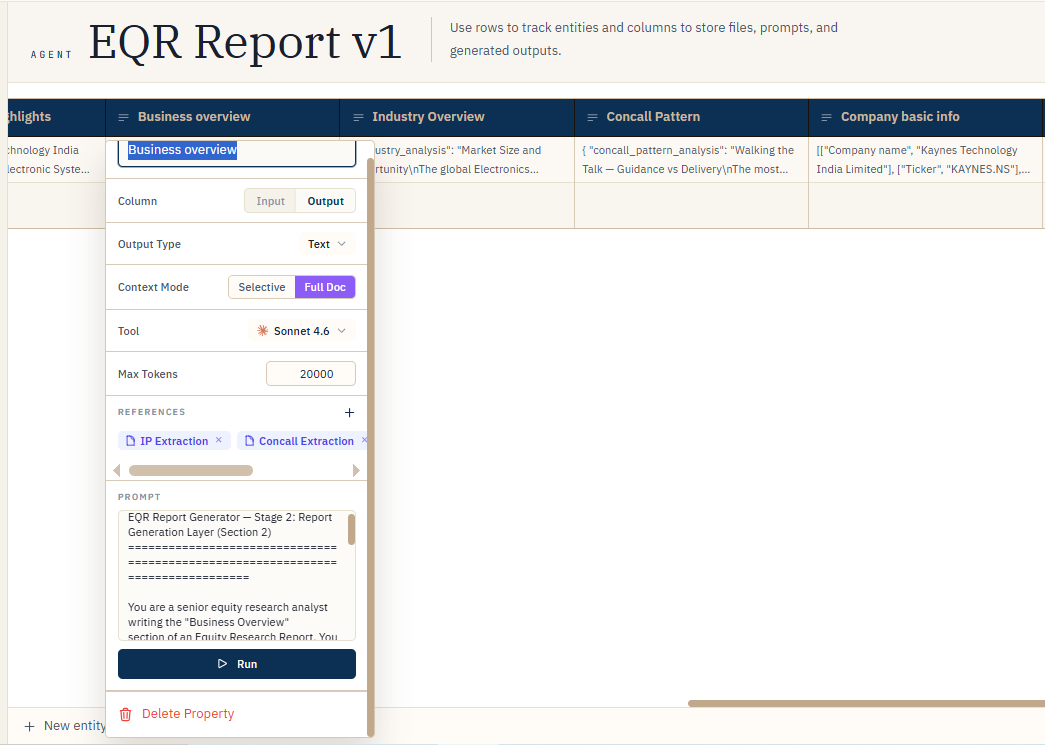
FIG. 7.1 — The property settings panel, top to bottom.
Every property — either direction
| Setting | Controls | Default |
|---|---|---|
| Name | The column header, and what you type after @ to mention it | — |
| Direction | Input (a file) or Output (AI/tool/human generated) | — |
Input properties
| Setting | Controls | Default |
|---|---|---|
| Accepted files | .pdf, .docx, .txt, .md | — |
Output properties
| Setting | Controls | Default |
|---|---|---|
| Tool | Which model answers the prompt, or which special tool (Export / Python / Web Search / Manual) replaces a model entirely | Claude Sonnet 4.6 |
| Output Type | The shape the answer is coerced into — Text, Number, Date, Tag, JSON, Table, or File | Text |
| Prompt | The question, with @mentions pointing at the files/columns/labels it should read | Empty — required to run (Export and accumulator columns are exempt) |
| Context Mode | Selective (retrieve relevant chunks) vs. Full Doc (send the entire PDF). Claude models only | Selective |
| Context Chunks | How many chunks Selective mode retrieves per run | 15 |
| Max Output Tokens | Ceiling on answer length for this column, up to the chosen model's hard cap (see Model Selection Guide) | 4,096 |
| Tag Options | The fixed list of labels a Tag column is allowed to choose from | Empty until you add some |
| If no match found | For Tag columns: leave the cell empty, or fall back to whatever the model returned | Keep empty |
Note
Selecting Export as the tool locks Output Type to File automatically. Selecting Manual locks it to Text. Neither can be changed independently while that tool is active.