02.1 — Building Agents
Properties Explained
A property is a column. Every property points one of two directions — in or out — and that single choice decides everything else about how the column behaves.
Input properties
An input property holds a file. Drop a document into the cell and it's ingested in the background: text extracted, split into chunks, embedded, and stored — ready to be queried by any output property in the same row.
Supported file types, currently:
| Extension | Treated as |
|---|---|
.pdf | PDF document |
.docx | Word document |
.txt | Plain text |
.md | Markdown |
Note
Drop more than one file into the same input cell and JMN AI spins up a Collection — a sub-agent with one row per file, so you can analyze each document individually instead of all at once. See Collections (Sub-Agents).
Output properties
An output property is a question, asked once and run against every row. What answers it — a model, a script, a document export, or a person typing directly into the cell — is controlled by the property's tool setting, covered in full in Tools & How They Work. What shape the answer takes is controlled separately, by output type.
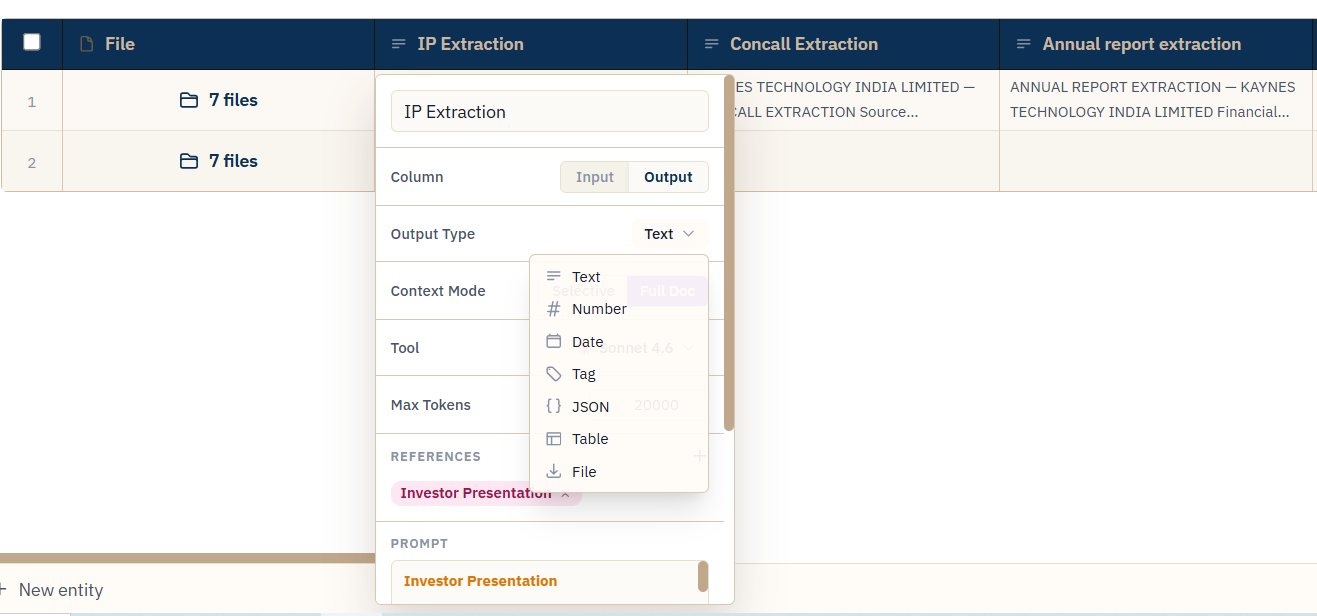
FIG. 3.1 — Every output property has one of seven types.
| Output type | What the cell holds | Enforced automatically |
|---|---|---|
| Text | Free-form written answer | — (default, no constraint) |
| Number | A single numeric value | Prompt instructed to answer with only a number |
| Date | A calendar date | Must come back as YYYY-MM-DD |
| Tag | One label from a fixed list | Must match exactly one of the property's Tag Options |
| JSON | A structured JSON value | No prose, no markdown fences — valid JSON only |
| Table | Rows and columns | JSON (list of objects or list of lists), rendered as a table |
| File | A generated, downloadable file | Set automatically when the property's tool is Export |
Note
Tag is the one type a human can correct after the fact, without re-running the AI — and the only type with a fallback setting for "if no match is found" (keep the cell empty, or fall back to whatever the model said). Both are covered in Tagging & Classification.
What can't change quietly
Editing a property's prompt or output type after cells have already run doesn't silently recompute them. Anything downstream gets marked stale instead, so you decide when to re-run rather than discovering a column has changed underneath you. Full mechanics in Keeping Results in Sync.